
Google Ads Management
Appear at the exact moment a customer is searching for what you offer. We build Search, Performance Max & Shopping campaigns that bring high-intent audiences — with transparent, measurable performance.
Google is where intent happens. People aren't just browsing — they're actively looking to buy, find a solution, or get in touch. That's what makes Google Ads one of the most powerful sales tools: it puts you in front of people who already want what you have.
But that power comes with a trap: without proper structure and optimization, your budget "burns" on irrelevant searches and the wrong audience. The difference between a profitable and a losing campaign is in the strategy, not the budget size.
As certified Google Partners, we set up and manage campaigns with clear goals and complete transparency. You always know how much each customer costs, which campaign is performing, and where every euro goes.
We don't "set and forget." We monitor, test, and continuously optimize, because the market and competition constantly change.
What we handle
Full Google Ads management.
Search campaigns
High-intent keyword targeting for immediate, measurable results.
Performance Max
Leveraging Google's entire network with AI-driven optimization & proper asset groups.
Shopping & feeds
Product visibility with a properly configured Merchant Center & optimized feeds.
Smart Bidding
tCPA/tROAS strategies for maximum return on your budget.
Tracking & measurement
Enhanced Conversions & Consent Mode v2 for reliable data despite privacy restrictions.
YouTube & Display
Awareness & remarketing across Google's network, so customers don't forget you.
Free guides for your Google Ads
Free chapters and eBooks from our team. No cost, no strings attached.
 Free eBook
SEO Guide 2026 (free eBook)
A condensed download: SEO today, AI search included, in a PDF you can read in an afternoon.
Read → Free guide
Facebook Ads: the 10 mistakes costing you money
The most common mistakes we see in Meta Ads accounts and how to fix them.
Read → Free guide
7 Facebook Ads mistakes: a starter guide
A quick check so you stop burning budget on wrong settings, from your first campaign.
Read →Want the full system for eShops, with feeds, PMax and measurement? See the eBook The Complete Google Ads System for eShops (€19).
How we work
A structured approach with continuous optimization.
Strategy
We analyze audience, competition & goals and build the plan.
Setup
We build campaign structure, tracking & conversion measurement properly.
Launch
We start with a controlled budget & clear KPIs.
Optimization
We test, scale what works & cut what doesn't.
Why us
Transparency & results.
Certified
Google Partners with deep experience across dozens of industries.
Transparent reporting
You see exactly where every euro goes and what it returns.
Continuous optimization
Ongoing work on campaigns, never "set & forget."
Full-funnel
We combine intent (Search) with awareness & remarketing, and where needed with Facebook and Instagram ads, for a complete result.
Search vs Performance Max: which to choose
Search campaigns target people already searching — high intent, immediate results. Performance Max leverages Google's entire network (Search, Display, YouTube, Gmail, Maps) with automation, ideal for scale.
In most cases, the right answer is a combination, with a clear split of budget & objectives. We design the mix that fits your specific situation.
How much budget do you really need
There's no magic number. The right budget depends on your industry, competition, and the value of each customer to you. We recommend a realistic amount that lets the algorithm learn and optimize.
Important: ad spend paid to Google is separate from the management fee. You always have full visibility on both.
The importance of accurate measurement
A campaign is only as good as its data. With Enhanced Conversions & Consent Mode v2, we ensure we measure results accurately despite cookie & privacy restrictions. This way the algorithm optimizes toward real sales, not empty clicks.
How do we structure a Google Ads account?
Structure is the first thing we look at in every audit, because it decides where the budget goes and what the algorithm learns. One "general" campaign with dozens of keywords in the same ad group cannot be optimised, however well the ads are written. We split the account by user intent and by the job of each campaign.
Search: separate campaigns per intent
Brand, generic keywords per service or category and, where it pays, competitors, each in its own campaign with its own budget. Ad groups stay thematically tight, Responsive Search Ads fill every asset slot with headlines that answer the query, and match types start with phrase and exact. Broad match only opens up once Smart Bidding has reliable conversion data. Negative keyword lists are shared at account level and refreshed weekly from the search terms report.
Performance Max and Shopping: a structure that follows the catalogue
For an eShop, Performance Max is set up with asset groups per product category and listing groups that follow the catalogue and the profit margin, using custom labels in the feed. We add brand exclusions so PMax does not claim the easy brand sales that Search would have brought anyway. Standard Shopping stays useful when you need full bid control per product or for controlled tests.
Remarketing and YouTube: separate budget, separate KPIs
Awareness and remarketing campaigns cannot be judged by the same cost per conversion as Search. They get their own budget and their own targets, so they do not blur the picture of the account.
tROAS or tCPA? Which bidding strategy, and when is it wrong?
Smart Bidding works as long as it has data. Choosing a strategy is not a matter of preference but of conversion volume, and the most common reason a campaign "dies" is that it was given a target it could not support.
The order we follow
In a new account we start with Maximize clicks with a CPC cap, or manual CPC, to collect search terms and clean up negatives. As soon as conversion tracking is verified we move to Maximize conversions without a target. Once conversions are steady, Google's indicative guidance is 30 or more a month per campaign, we set a target CPA close to the real history and tighten it gradually. Target ROAS only makes sense when conversions have different values, such as an eShop with baskets of very different sizes, and there is enough volume for the algorithm to tell them apart.
When the choice is wrong
- tROAS for lead generation. If every lead has the same "value", the algorithm has nothing to optimise. That is where tCPA belongs or, better, offline conversions carrying real customer value.
- An aggressive target from day one. The campaign loses impressions, collects less data and spirals. Targets move in steps, not jumps.
- Changes every few days. Each strategy or target change resets the learning phase. We let the data speak before touching anything.
- Sales without a seasonality adjustment. During Black Friday or promotions we tell Google about the expected change in conversion rate instead of hand-editing bids and losing the history.
How we measure conversions properly: Enhanced Conversions, Consent Mode v2 and GA4
A campaign is only as good as its data. Before we open any budget we check what exactly is recorded as a conversion, with which value, and how much of it is lost along the way to cookies and consent.
What we set up, in order
Google Tag Manager with a clean dataLayer. Every event that matters, purchase with transaction_id and value, generate_lead, a phone call from mobile, passes through one place, so Google Ads and GA4 see the same numbers. Consent Mode v2: since 2024 it is a requirement for remarketing and conversion modelling for EU users. We wire it to your cookie banner so you measure as much as the law allows without breaching GDPR. Enhanced Conversions: the email or phone number from the form or checkout is sent hashed, so Google can match conversions the cookie lost.
For bidding we prefer the native Google Ads tag as the primary conversion, because it is faster and shows fewer discrepancies, and we import GA4 key events as secondary for analysis. For service businesses the most important step is offline conversion import: we upload from the CRM which leads became real customers and at what value, so the algorithm learns to bring customers, not just forms.
Merchant Center and feed quality: why it decides Shopping
There are no keywords in Shopping or Performance Max. Google decides when, and for which search, to show your product purely from the feed data. A mediocre title or a wrong category costs impressions every day, silently.
What we work on in the feed
Titles built as brand, product type, key attribute, size or colour, with the important words first, because on mobile only the first words are visible. GTIN or MPN on every SKU so the product locks onto Google's catalogue and wins price comparisons. A correct google_product_category and a product_type that mirrors the store structure. Custom labels for margin, seasonality and best sellers, so each group gets the tROAS it deserves.
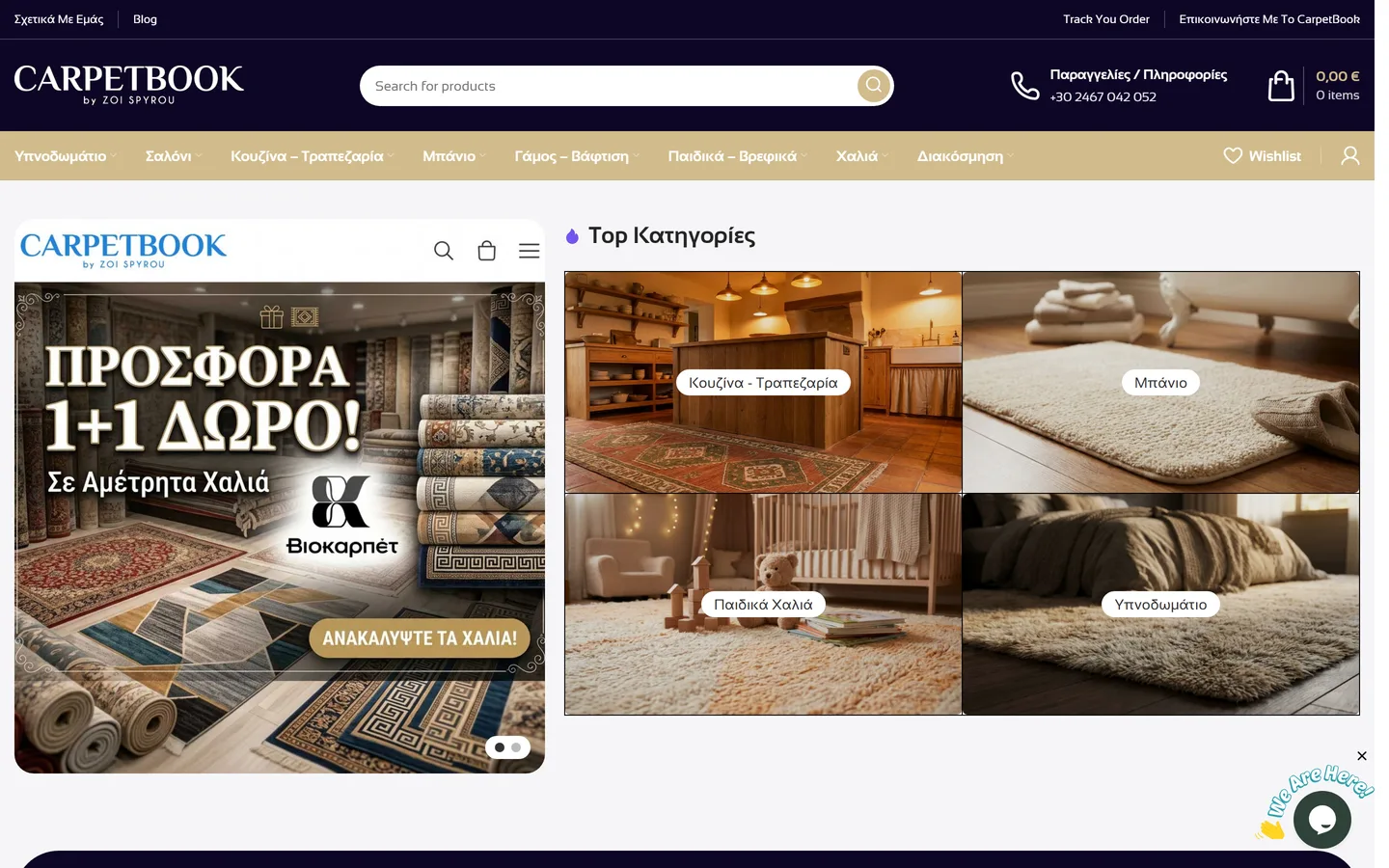
Prices and availability sync automatically from the eShop, because any mismatch between the feed and the product page leads to disapprovals. Changes we do not want to touch the store are made with supplemental feeds. And a frequent question: the Skroutz and BestPrice feed is not the same file as Merchant Center. They have different specifications and we build them separately, as we did for CarpetBook.gr, where feeds update automatically for thousands of SKUs with zero manual entries.
How much does Google Ads advertising cost?
There are two separate costs and you always see them separately: the spend paid to Google, the budget you set and can change from day to day, and our management fee. There is no minimum budget that applies to everyone, but there is a way to work out yours.
What shapes the cost
Cost per click depends on the competition in your industry and on the Quality Score of your ads and landing page. Conversion rate depends on the page we send the user to. And how much a customer can "afford" to cost depends on your margin and their lifetime value. If, for instance, your industry has expensive clicks and your page converts one visitor in a hundred, a very small monthly budget is not even enough for the algorithm to learn. In that case we tell you before we start, and often the right first move is the landing page, not more budget.
The management fee depends on complexity: number of campaigns, feeds and Merchant Center, countries and languages, landing pages and tracking needs. Setup is priced separately from monthly management, and we do not tie you into 12-month contracts. Request a quote with your numbers and you will get a concrete budget and fee proposal.
The mistakes we see most often in Google Ads accounts
Almost every account we take over has at least three of the following. It is not a question of skill; the platform defaults work for Google, not for you.
- Broad match without Smart Bidding and without negative keywords, bringing clicks from irrelevant searches.
- Search partners and Display expansion switched on by default in Search campaigns.
- The homepage used as landing page instead of a page that answers the query.
- Conversions that are plain page views, or no conversion tracking at all, while tCPA is running.
- Performance Max without brand exclusions, "winning" the brand sales that belong to Search.
- Location targeting on "Presence or interest", showing ads to people outside the country.
- Auto-applied recommendations left on, changing keywords and budgets without approval.
- A single RSA per ad group, with no test of different messages.
The audit we run at the start of every engagement checks exactly these points, with a concrete fix list and an estimate of the budget already being wasted.

Our work in practice
Related case studies with real, measurable results.


Frequently asked questions
Google Ads.
How much budget do I need?
Is ad spend separate from the management fee?
How soon will I see results?
Do you work with small budgets?
Do you also run Meta Ads?
Will I have access to my account?
What is Consent Mode v2 and does it concern me?
Performance Max or Standard Shopping for my eShop?
What our clients say
Η συνεργασία μας με την Qbrains (και προσωπικά με τον Ηρακλή) αποτελεί καθοριστικό παράγοντα για την άρτια λειτουργία του ηλεκτρονικού μας καταστήματος. Ως επιχείρηση που λειτουργεί με γνώμονα τη διαχρονικότητα και τον απόλυτο έλεγχο ποιότητας από το 1966, αναζητούμε το ίδιο επίπεδο ακρίβειας και από τους συνεργάτες μας. Η ομάδα της Qbrains παρέχει εξαιρετική τεχνική υποστήριξη, ταχύτατη ανταπόκριση και κορυφαία τεχνογνωσία. Ένας πραγματικά στρατηγικός συνεργάτης που συνιστούμε ανεπιφύλακτα.
Γνώστες του development και τεχνικής υποστήριξης ακόμη και σε custom eshops με αρκετές δυσκολίες όπως το δικό μας. Με υπομονή και επεξήγηση σου δείχνουν το πρόβλημα και προτείνουν την λύση.
Μετά από 7 μηνες συνεργασίας μπορώ να πω ότι ότι λένε το τηρούν (έχουν δει πολλά τα μάτια μου εκεί εξω) Υπάρχει ένα πολύ καλό επίπεδο συνεννόησης που είναι τρομερά σημαντικό ιδιαίτερα σε περίπτωση ανάγκης. Αξίζει κάποιος να συνεργαστεί με την εταιρεία
Αυτο το team εργάζεται σε ένα άλλο επίπεδο ! Φιλική προσέγγιση ,κατανόηση των αναγκών του πελάτη ,άμεση επίλυση των προβλημάτων που προκύπτουν και πολύ καλές τιμές . Συγχαρητήρια τους συστήνω ανεπιφύλακτα !
Άψογη και ταχύτατη εξυπηρέτηση 24/7 ακόμα και μέσα στην καρδιά του καλοκαιριού. Η συνεργασία μας κρατάει σχεδόν 10 χρόνια και ελπίζω για ακόμα περισσότερα.
Πολύ καλοί στον Προγραμματισμό και την Διαχείριση.
Related articles
From our blog (articles are in Greek).
 AdWords Tips
H Google επεκτείνει τις διαφημίσεις αναζήτησης ξανά! - Τι πρέπει να γνωρίζετε
H Google επεκτείνει τις διαφημίσεις αναζήτησης ξανά! Τι πρέπει να γνωρίζετε Όταν η Google κυκλοφόρησε για πρώτη φορά διαφημίσεις εκτεταμένου κειμένου το 2016, ο…
Read →20 September 2018 AdWords Tips
Οι Μεγάλες Αλλαγές στο Google AdWords - Σεπτέμβριος 2016
Ο Σεπτέμβριος του 2016 θα μας βρει με πολλές αλλαγές για το Google AdWords. Όσο εμείς ήμασταν διακοπές, η Google δούλευε πυρετωδώς για να μας παρουσιάσει αρκετά…
Read →26 August 2016 AdWords Tips
Εύκολη Στρατηγική AdWords Bidding για Νέους & Όσους Μισούν τα Μαθηματικά
Ευκολή Στρατηγική AdWords Biding Για όσους "μισούν" τα μαθηματικά, είναι νέοι στις διαφημίσεις ή απλά επιθυμούν την εύκολη και γρήγορη λύση οι συνεργάτες μας στ…
Read →22 June 2016